
Overview
Symbio is a communications technology company providing infrastructure and enterprise solutions across the Asia-Pacific region.
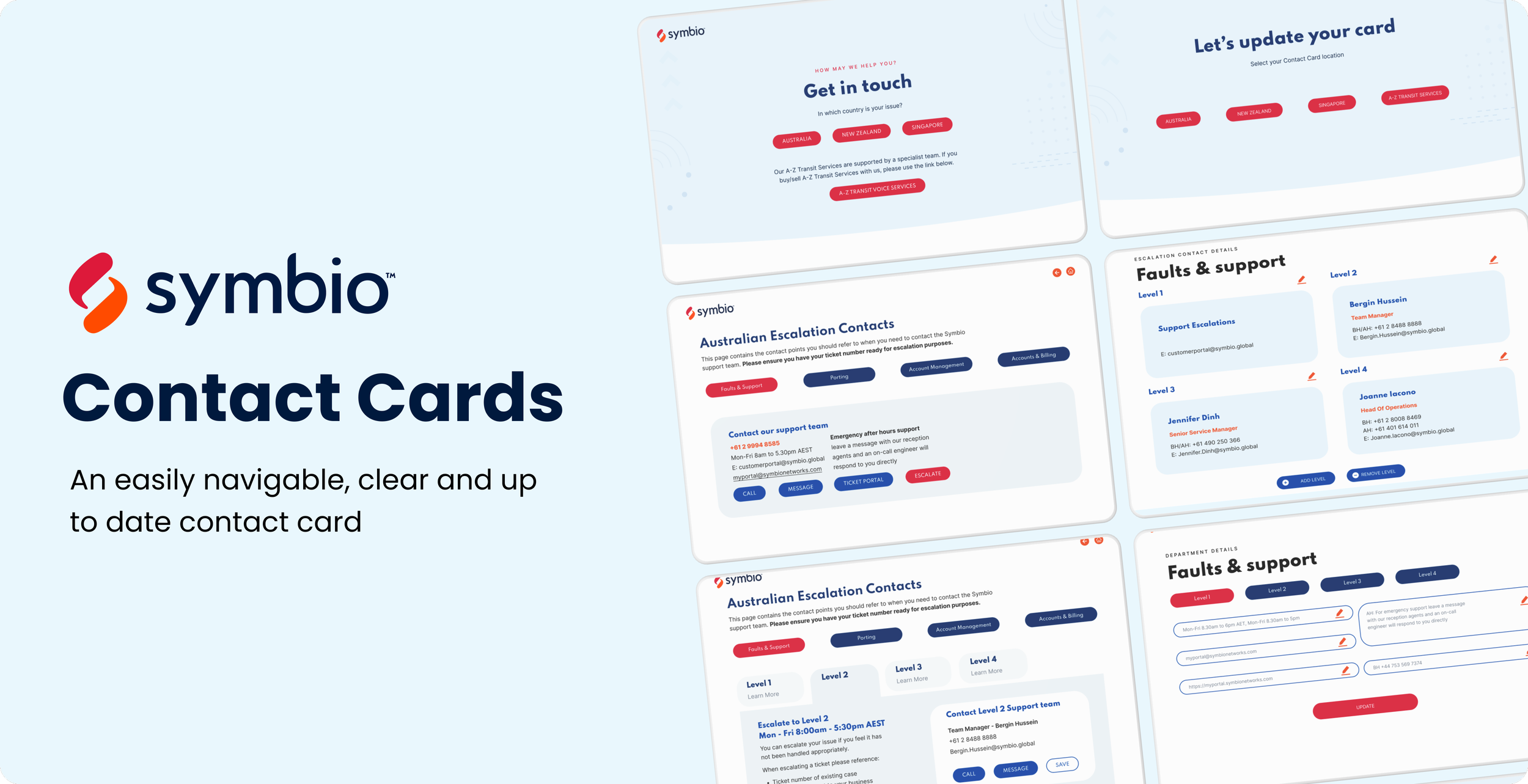
Due to Symbio’s complex product offering, customers need an effective way to reach the right support. They can do so by checking a contact card which is saved as a PDF document and hosted online.
However, the contact card is not a dynamic digital product and the plain view of the escalation matrix can also entice customers to skip the protocol and go straight to the top level of escalation contacts, undermining Symbio’s internal processes.
I worked as a UX/UI Designer to improve the contact management tool used by both internal teams and customers to manage and access contact information.
Conducted stakeholder interviews to identify pain points
Synthesised research into key usability issues
Designed improved information architecture and layouts
Created wireframes and interactive prototypes
Supported usability testing and iterative improvements
My Role:
Discover the problem
Through stakeholder interviews and user research, I identified that while users could technically find contacts, the experience was inefficient and cognitively demanding—especially in time-sensitive scenarios.
Key issues included:
Contact information is not always up to date as customers either print and store the document or go into their CRM and grab the number.
Too much information on the contact card makes it hard to digest and causes a lot of confusion for the customer,
the plain view of the escalation matrix can also entice customers to skip the protocol and go straight to the top level of escalation contacts, undermining Symbio’s internal processes.
Poor scalability led to a cluttered interface as data increased, with no structured system for organising content.
These issues led to slower task completion, increased cognitive load, and growing frustration among both internal teams and external clients.
Problem Statement
Time-poor Symbio customers escalate urgent issues without following the escalation matrix due to unclear criteria and an overabundance of information on contact cards & need an easily navigable,clear and up to date contact card to reach out to the right person to resolve problems efficiently.
Design Approach
With the core usability issues in mind, I reframed the design goal from simply “redesigning the contact card interface” to a more meaningful challenge:
How might we enable users to access key contact information quickly and efficiently, while supporting both internal workflows and external communication as the system scales?
1. Digitise the contact card to ensure accuracy
One of the key pain points identified was that contact information was frequently outdated. To address this, I shifted the experience from static, document-based contact sharing to a centralised digital contact portal.
By digitising the contact card, users will be able to access the most up-to-date information in real time, eliminating the risks associated with outdated printed materials or duplicated data across systems.
This approach also allowed for greater flexibility in how information is structured and maintained.
2. Introduced clearer information hierarchy
To address the lack of clarity in the existing interface, I introduced a stronger information hierarchy by grouping related content and prioritising the most important details—such as name, role, and primary contact methods.
The escalation matrix remains hidden, and escalation contacts are only displayed when customers choose to escalate a case.
This allowed users to scan information more easily and reduced the cognitive effort required to interpret the interface. Meanwhile, it helps maintain Symbio’s internal workflows and improves overall operational efficiency.
3. Designed for scalability
I also designed the layout with scalability in mind. By structuring content into clearly defined sections and creating a system that could accommodate increasing amounts of data, the interface remains organised and usable as the product grows.
This ensures that the experience does not degrade over time, even as more information is introduced.
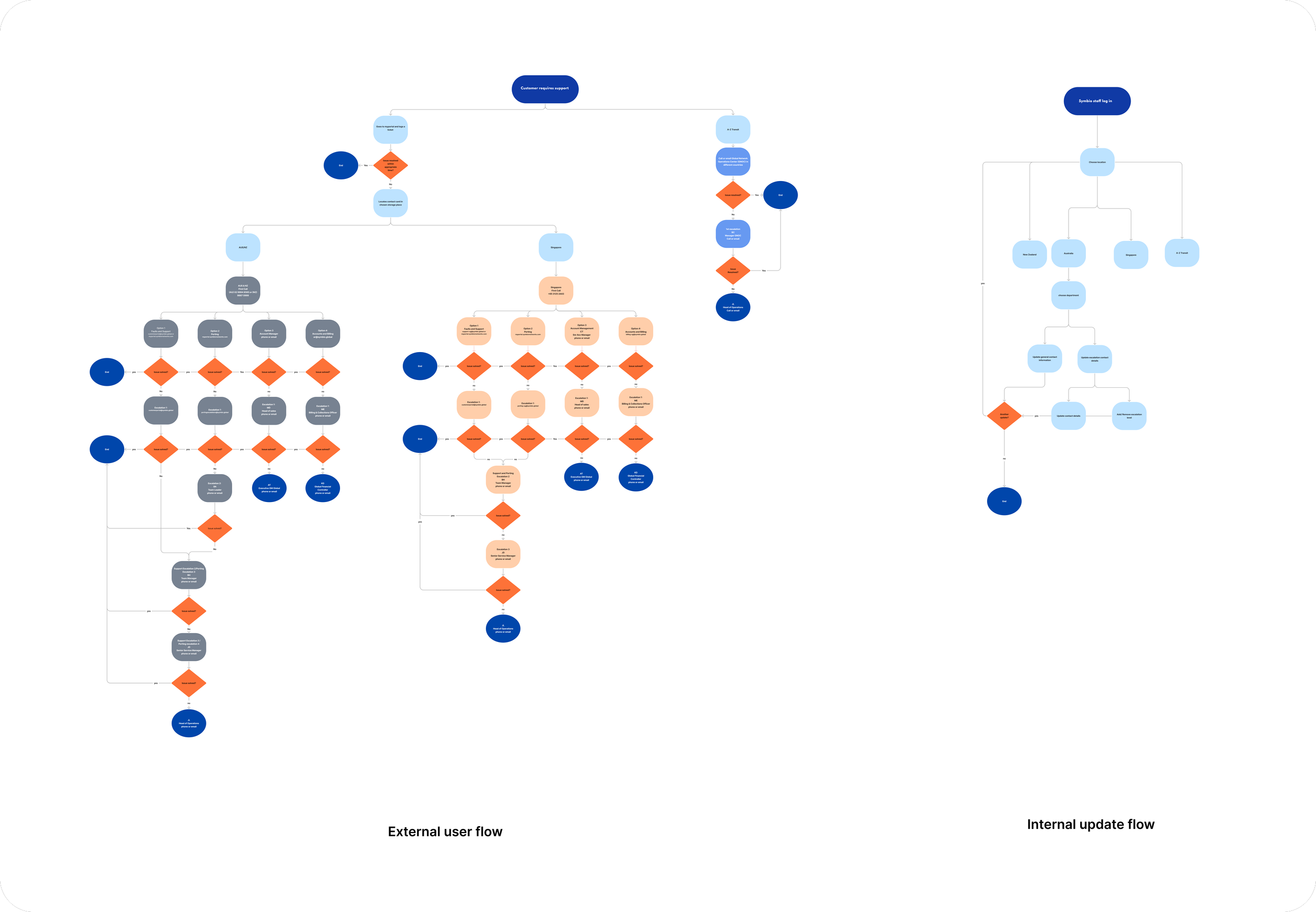
In the process I also realized a successful customer-facing contact portal couldn’t be guaranteed without providing an internal solution to update the card easily.
So I decided to design two portals and mapped out both external customer flow and internal update flow.
Validation & Iteration
To validate the design decisions, I conducted usability testing sessions with both internal stakeholders and external customers, focusing on how effectively the new interface supported their day-to-day tasks.
For internal stakeholders, the redesigned solution made it significantly easier to maintain and distribute contact information. By centralising updates within a digital portal, internal teams no longer needed to manually revise and resend static documents or respond to repeated information requests.
As a result, internal stakeholders were able to manage contact information more efficiently, minimise repetitive tasks, and focus on higher-value work
External Customers were also able to locate contact information more quickly, experienced less confusion when searching for key details, and expressed greater confidence in navigating the interface.
Final Product
1.Customer facing contact portal
Simple & Clear
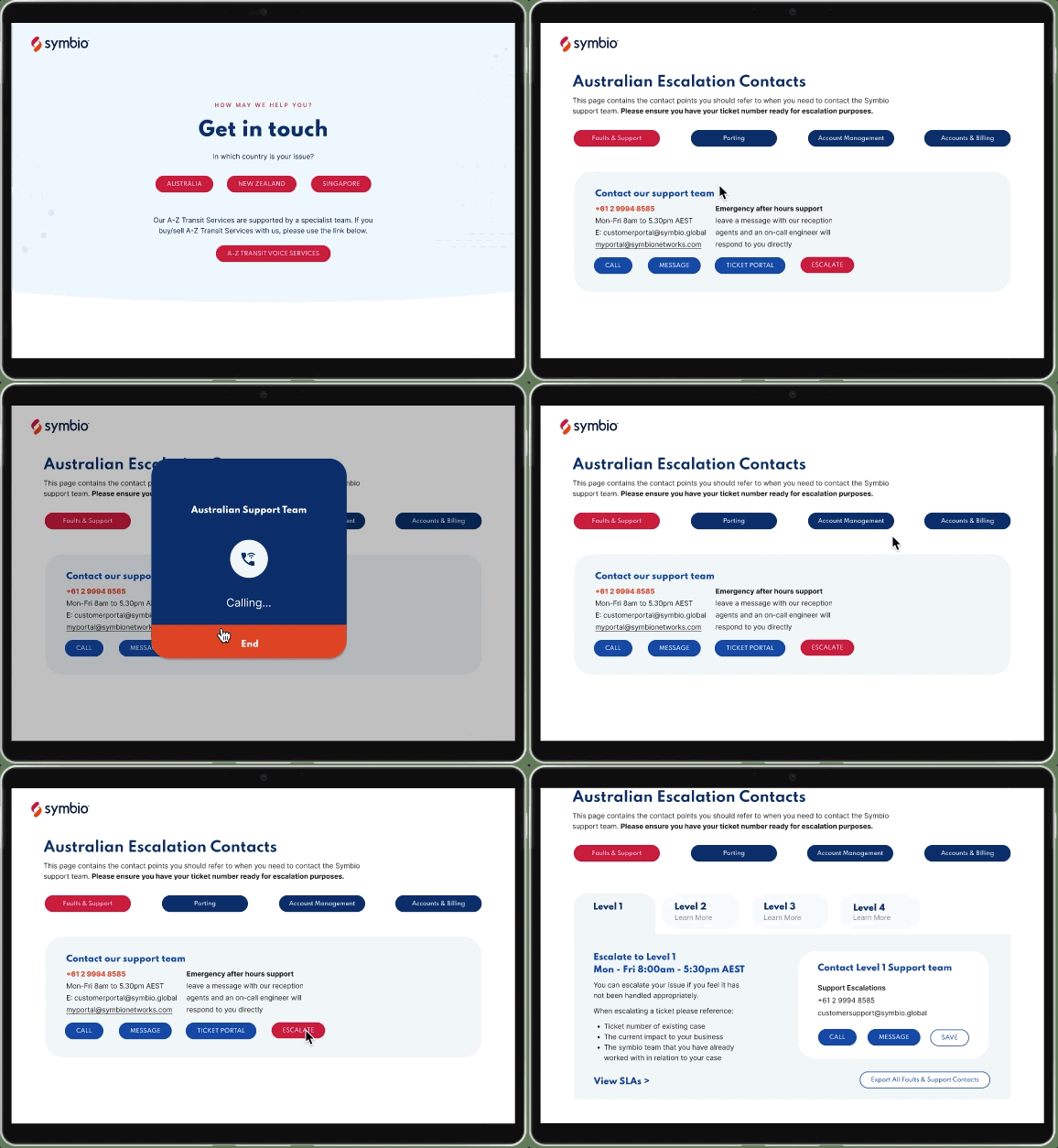
With a clear flow within only a few clicks the customer can be directed to the contact point for their specific issues and seeing only one level at a time allows the customer to clearly see what contact details or escalation is required.
Always up-to-date
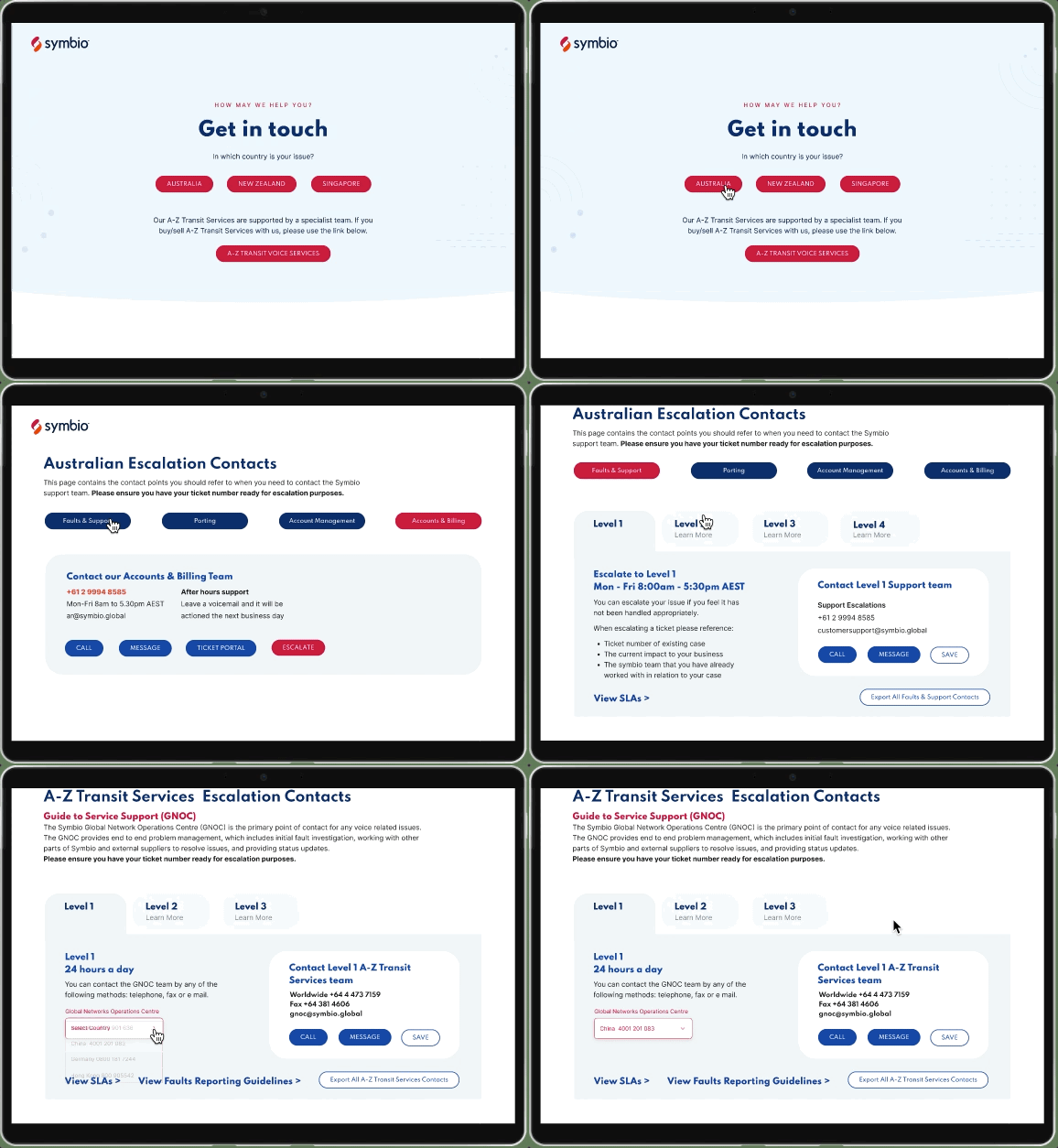
One simple access point for all the contact information; Customers still have the option to save or copy them into their CRM system but automated emails will alert him when changes have been made.
2. Internal update portal
Scalability & Flexibility
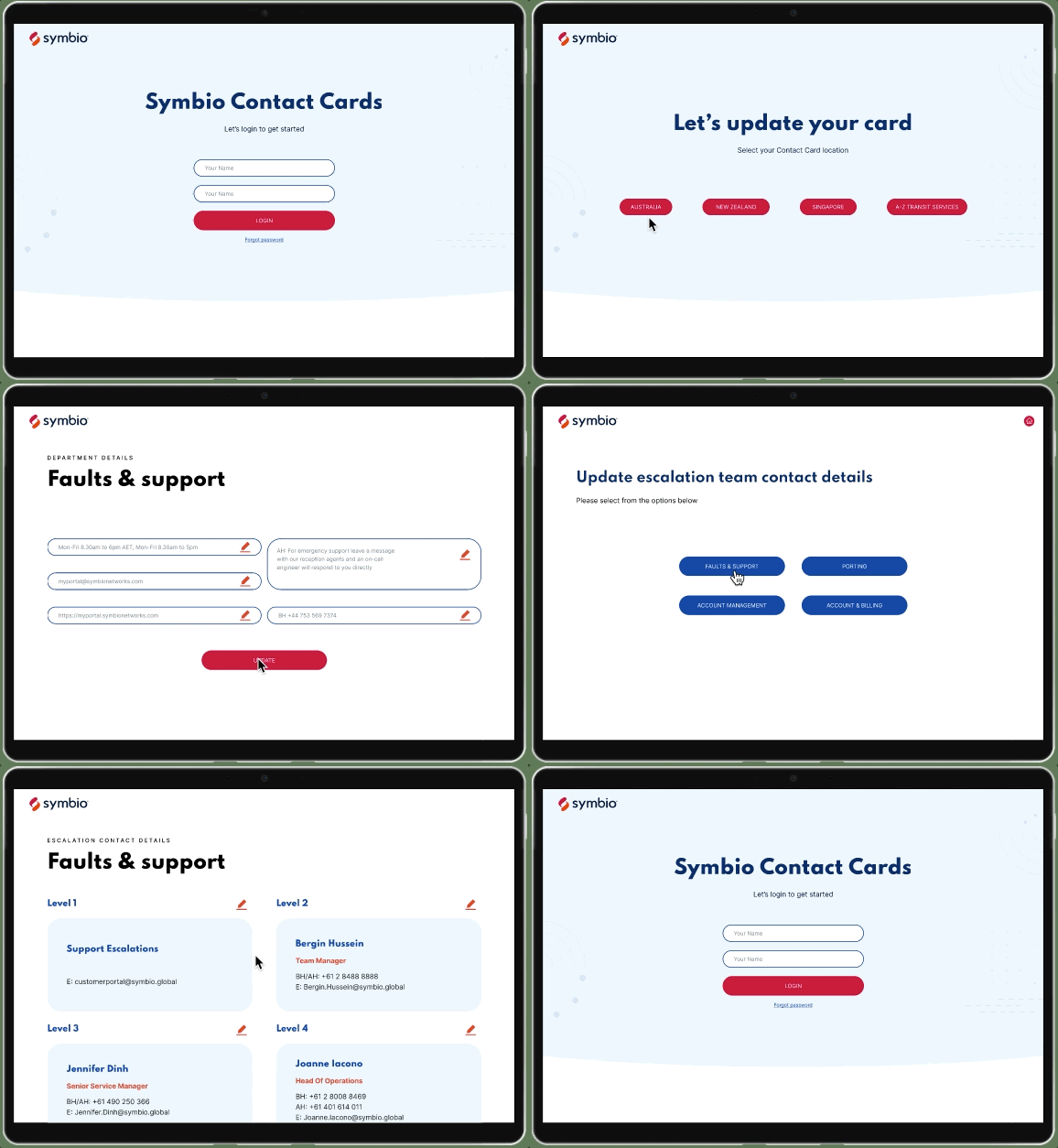
One single reference point that can be saved and shared from multi places. Authorized managers can take ownership of their cards and keep them up to date easily. And as Symbio grows, the solution can be easily expanded as needed across business units and countries.
Outcome
Within a short project timeframe, the redesign:
Improved efficiency or internal users
Enhanced usability for external customers
Reduced time required to access key contact information
Created a scalable foundation for future product growth
Reflections
Even small structural improvements can significantly impact both internal workflows and external outcomes
Aligning with stakeholders early helps prioritise high-impact changes.
Designing for scalability is essential in B2B, data-heavy tools